Introducing FlatSpec: PDF downloads and product spec comparison
Meet FlatSpec, our free Chrome extension for downloading technical PDFs, exporting web tables to Excel and comparing product specifications locally.
By FlatRelay · Updated
Practical guidance from a consultancy selling SEO and AI visibility services. Sources, examples, and limitations are identified in the text. Editorial standards and corrections.
Product news from FlatRelay about our own software. Features describe the current release; sample data is illustrative.
- FlatSpec
- PDF downloader
- Product specifications
- Excel export
FlatSpec is our free Chrome extension for collecting technical documents and comparing product specifications. Developed by FlatRelay with FlatAEC, it helps manufacturers, exporters, suppliers and AEC teams keep source files and technical evidence together while researching products.
FlatSpec at a glance: download PDFs and other technical files, export webpage tables to Excel or CSV, organize resources into projects, and compare explicitly identified products from selected documents. Processing and saved project data stay locally in your Chrome profile. No account or document upload is required.
Why we built FlatSpec
A product evaluation can start with a supplier webpage and quickly spread across datasheets, manuals, spreadsheets and specification tables. The useful facts are there, but keeping a value attached to the right product and source takes work.
FlatRelay helps industrial businesses make their information easier to find and understand. FlatSpec brings that same focus to the researcher’s browser: collect the source, retain the evidence, and make differences easier to inspect. FlatAEC connects the tool to the document-heavy work of architecture, engineering and construction.
Download PDFs and export specification tables
The toolbar badge shows the number of visible PDF links on a webpage. Open the popup to preview supported files and tables, filter filenames using text or regular expressions, and choose the items you need.
FlatSpec supports original-file downloads for PDF, XLSX, CSV, DOCX, RFA and RVT links. Webpage tables can be exported directly to Excel or CSV. Downloads go to their source websites; exporting a table creates a file locally.
Keep a project deck with source references
Save selected resources into a project and group, such as a valve shortlist or equipment package. Each saved resource retains its source-page reference, so you can return to the supplier page when you need context.
You can rename groups, organize projects and review saved resources in the deck. A disk indicator appears when Chrome reports a matching completed download still exists. It uses matching Chrome download records and does not scan your filesystem.
Compare product specifications with their evidence
In Requirements, select local PDF, XLSX, CSV or Word (.docx) files for analysis. FlatSpec extracts explicitly named products or services and confidently bound technical attributes. When the product assignment is unclear, it skips the attribute rather than guessing.
Select products to compare their properties side by side. Differences, missing values and conflicting evidence are highlighted, with original excerpts and document locations available for inspection. Export the comparison to Excel or CSV when you need to share your working table.
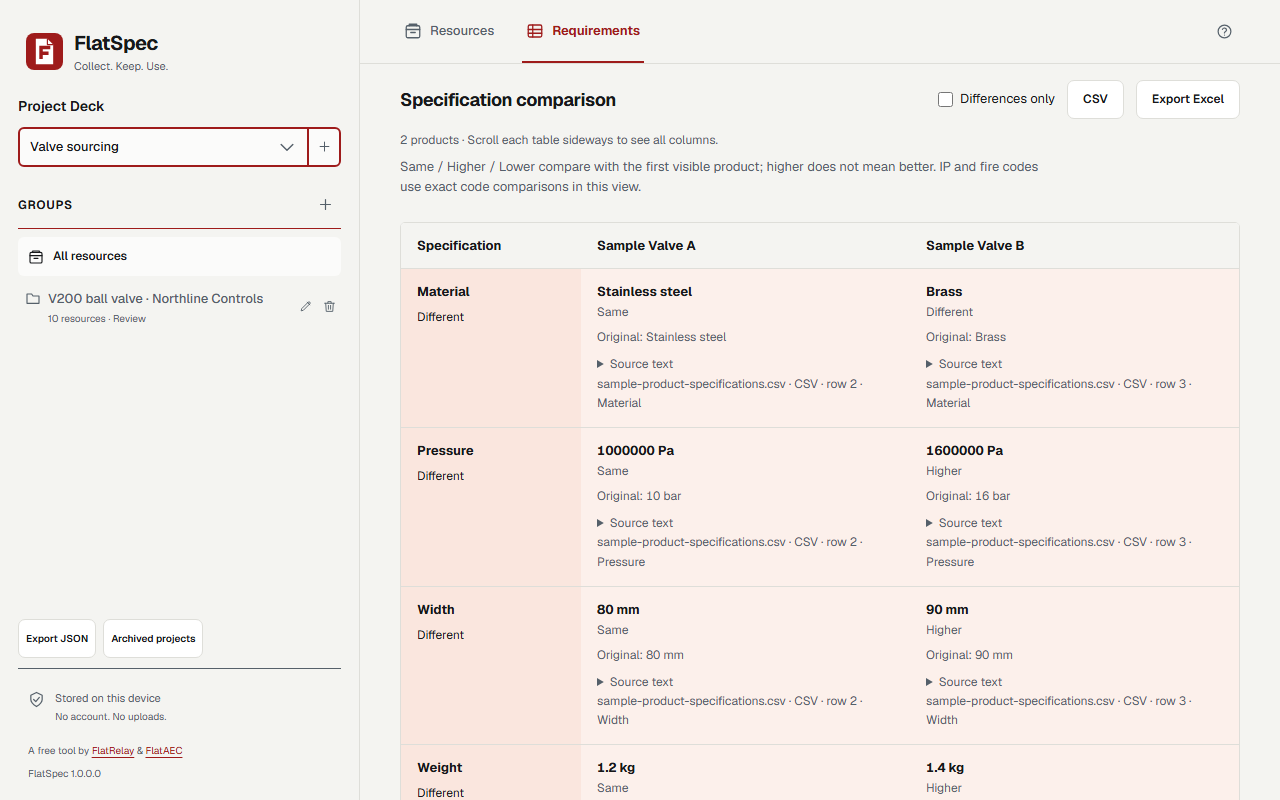
Actual FlatSpec 1.0.0.0 interface with fictional sample products. The screenshot demonstrates the workflow; it is not manufacturer data or a customer result.
For example, a CSV with labeled Model, Material and Pressure columns can produce two product records. A 10 bar value and a 16 bar value are displayed as different, with the source rows retained. A higher value alone does not establish which product is suitable for your application.
Optional project requirements can flag recorded attributes as PASS, FAIL or UNKNOWN against your rules. These checks support document review; they do not certify a product or replace engineering judgment.
Local processing and practical limits
FlatSpec has no analytics, AI service or processing server. Imported file bytes are read locally; the saved records contain extracted attributes, source evidence and analysis summaries. See the FlatSpec privacy policy for permissions, retention and download-status details.
Document analysis supports batches of up to 20 files, with a 20 MB limit per file. Scanned PDFs need OCR before import. Legacy DOC and XLS files need conversion. Images, formula cells and embedded objects are not interpreted, and Revit files are supported for download rather than specification extraction. Complex document layouts may yield fewer attributes.
Questions about FlatSpec
Is FlatSpec free?
The current version is free and does not require an account. There is no paid feature or subscription in this release.
Does FlatSpec upload my documents?
No. Selected documents are analyzed on your device. Original-file downloads contact their source websites, and opening a saved source link is a normal browser navigation.
Is FlatSpec available in the Chrome Web Store?
Version 1.0.0.0 is being prepared for Chrome Web Store submission. A verified installation link will be added here when the listing is available. No public store listing is linked yet.
Follow the product’s next step
FlatSpec is part of our work to make technical product information easier to use, from supplier websites to project decisions. To ask about availability or share feedback, email [email protected] or use the contact page. You can also explore our supplier content guidance and FlatAEC.